
Last updated on
Oct 30, 2026

MT MV10 2014 free printable template
pdfFiller is not affiliated with any government organization

Fill out
Complete the form online in a simple drag-and-drop editor.

eSign
Add your legally binding signature or send the form for signing.

Share
Share the form via a link, letting anyone fill it out from any device.

Export
Download, print, email, or move the form to your cloud storage.
Why pdfFiller is the best tool for your documents and forms


End-to-end document management
From editing and signing to collaboration and tracking, pdfFiller has everything you need to get your documents done quickly and efficiently.
Accessible from anywhere
pdfFiller is fully cloud-based. This means you can edit, sign, and share documents from anywhere using your computer, smartphone, or tablet.
Secure and compliant
pdfFiller lets you securely manage documents following global laws like ESIGN, CCPA, and GDPR. It's also HIPAA and SOC 2 compliant.
What is MT MV10
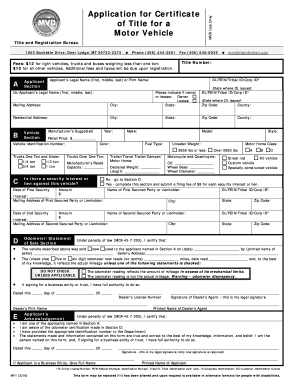
The Montana Break/Bond Title Application is a legal document used by vehicle owners to obtain a title for their vehicle when the original title is unavailable.
pdfFiller scores top ratings on review platforms




Muy fácil de usar, muy práctico e intuitivo. Buena aplicación y la más barata del mercado. Muy recomendable
This is the best application that I have used
Who needs MT MV10?
Explore how professionals across industries use pdfFiller.

MT MV10 is needed by:
-
Individuals purchasing a vehicle without a title
-
Owners of motor vehicles, trailers, or boats without certification
-
People needing to register manufactured homes in Montana
-
Notaries verifying the applicant's signature and intent
-
Real estate professionals assisting clients with title issues
Comprehensive Guide to MT MV10
What is the Montana Break/Bond Title Application?
The Montana Break/Bond Title Application is a crucial form that allows individuals to obtain a vehicle title when they cannot provide a certificate of title that assigns the prior owner's interest. This application is necessary in specific scenarios, such as when a vehicle is purchased without a title or in cases of lost titles. The form covers various types of vehicles, including motor vehicles, trailers, motorboats, and manufactured homes.
Purpose and Benefits of the Montana Break/Bond Title Application
Obtaining a title using the Montana Break/Bond Title Application is essential when a certificate is unavailable. It provides legal recognition of ownership, ensuring that the vehicle can be registered successfully. This form helps avoid potential legal issues regarding vehicle ownership and establishes a clear record of the applicant's rights to the vehicle.
Some benefits of using this form include:
-
Legal acknowledgment of ownership
-
Eligibility for vehicle registration
-
Resolution of ownership disputes
Key Features of the Montana Break/Bond Title Application
The application form encompasses several critical elements that applicants must be aware of:
-
Detailed information about the vehicle, including make, model, and vehicle identification number (VIN)
-
Proof of purchase, which may involve providing a bill of sale
-
Notarization requirement to validate the application
-
Optional surety bond based on the assessed value of the vehicle
Eligibility and Who Needs the Montana Break/Bond Title Application
This application is intended for both individuals and businesses seeking to obtain a title for their vehicles. Specific situations that necessitate this form include:
-
Purchasing a vehicle from an unlicensed dealer
-
Inheritance of vehicles without proper documentation
-
Acquisition of vehicles through gifts or barter
Applicants should be aware of potential disqualifications, such as having prior title issues or failing to provide thorough documentation.
How to Fill Out the Montana Break/Bond Title Application Online
Filling out the Montana Break/Bond Title Application online can be simplified by following these steps:
-
Gather necessary information including your legal name and vehicle details
-
Complete each section of the form, ensuring all fields are addressed
-
Review your entries to avoid common pitfalls, such as incorrect vehicle identification numbers
Comprehensive instructions are provided within the application to guide you through the process.
Review and Notarization of the Montana Break/Bond Title Application
Before submission, it is essential to review the Montana Break/Bond Title Application for accuracy. Notarization lends validity to the form, and you can obtain this in various locations, including banks and notary services. Depending on the context, digital signatures may be acceptable, but wet signatures are traditionally required.
Ensure you follow these key steps for notarization:
-
Bring valid identification
-
Complete the form with all information filled in
-
Sign the form in the presence of the notary
Submission Methods and Processing Details
After completing the application, there are several methods available for submitting it to the Title and Registration Bureau. Applicants should consider:
-
Mailing the application to the appropriate office
-
Submitting in person at designated facilities
-
Online submission, if available
Be aware of the fees associated with submission, which can vary based on the vehicle type and specific circumstances. Processing times can also differ, so it is wise to confirm the status of your application after submission.
What Happens After You Submit the Montana Break/Bond Title Application?
Once you've submitted your application, tracking its status becomes the next priority. It's essential to follow these steps:
-
Monitor your application status through the designated channels
-
If issues arise, correct or amend the application as necessary
-
Be aware of common reasons for rejection and strategies to address them
Understanding this process can save time and reduce stress following submission.
Security and Privacy Considerations for the Montana Break/Bond Title Application
Handling personal documents requires a strong emphasis on security. With pdfFiller, security measures, including encryption and compliance with regulations, are in place to protect sensitive information. Safeguarding your data during the submission process is paramount, and utilizing a secure platform ensures peace of mind.
Getting Started with pdfFiller to Complete Your Montana Break/Bond Title Application
Using pdfFiller to fill out your Montana Break/Bond Title Application is an efficient choice. The platform offers ease of use with features such as editing, sharing, and securely storing completed forms. By using pdfFiller, you can enhance your experience with the application process and streamline your document management.
How to fill out the MT MV10
-
1.To access the Montana Break/Bond Title Application on pdfFiller, first navigate to the pdfFiller website and sign in to your account. Use the search bar to locate the form by typing its name or keywords.
-
2.Open the form, and familiarize yourself with the layout. You will see fillable fields, checkboxes, and sections for information input. Make sure you have all necessary supporting documents ready before you start.
-
3.Gather essential information such as your legal name, address, identification number, and details about the vehicle. You may need proof of purchase and a surety bond if applicable.
-
4.Start by filling in the 'Applicant's Legal Name' and 'Mailing Address' fields at the top of the form. Use pdfFiller’s typing tool to enter your information directly into the fields. Ensure accuracy and check for any typos.
-
5.Continue filling in subsequent sections, including your 'Identification Number' and details about the vehicle purchased or acquired from. Follow the prompts and fill out every required field to avoid submission delays.
-
6.In sections where checkboxes are present, click to select the options that apply to your situation. Carefully read any declarations related to the correctness of your information and the legal conditions of the title application.
-
7.Once all required fields are completed, review the form thoroughly for any missing or incorrect information. Ensure that everything is accurate and complete, as this can speed up the processing time.
-
8.Finalize the document by signing in the designated area as the owner/applicant. Make sure to do this in the presence of a notary, who will also need to sign the form.
-
9.After completing the form, utilize pdfFiller's saving options. You can save your work as a PDF, download it directly to your device, or submit it online if submitting electronically is allowed.

What are the eligibility requirements for the Montana Break/Bond Title Application?
To be eligible for the Montana Break/Bond Title Application, you must be the legal owner of the vehicle and unable to provide the original title. Proof of ownership or purchase and compliance with state regulations are essential.
What documents are needed to submit with this application?
You must submit proof of purchase, which can include a bill of sale, and possibly a surety bond, depending on the vehicle's value. Ensure you have identification and any other supporting documents ready.
Is notarization required for the Montana Break/Bond Title Application?
Yes, notarization is required. The applicant must sign the form in the presence of a notary, who will verify the identity of the signer and validate the document.
What common mistakes should I avoid when filling out this form?
Common mistakes include leaving fields blank, incorrect signatures, not providing required documentation, and failing to notarize the form. Double-check for accuracy before submission.
How long does it take to process the Montana Break/Bond Title Application?
Processing times may vary, typically ranging from a few weeks to several months depending on the volume of applications received by the Title and Registration Bureau. It's advisable to apply well in advance if you have deadlines.
Can I submit the form online or do I need to mail it?
Submission methods can vary. While some forms may allow electronic submission, it is generally advised to check with the Title and Registration Bureau for the preferred submission method, which may include mailing the completed form.
Where do I send my completed application?
Completed applications should be submitted to the Montana Title and Registration Bureau. Check the official guidelines for any specific mailing addresses or additional submission details.
MT MV10 Form Versions
Related Forms



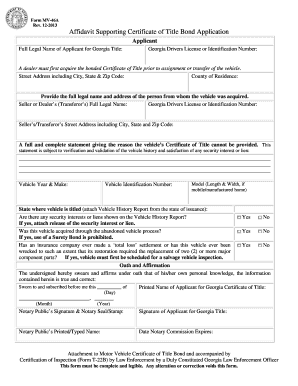

Get the latest insights from our blog


If you believe that this page should be taken down, please follow our DMCA take down process
here
.
This form may include fields for payment information. Data entered in these fields is not covered by PCI DSS compliance.